Slide Library
Use Slide Library to insert slides you use often into a presentation. This helps you add slides that are already prepared for data population.
The first slide contains shapes required by OfficeReports and is not shown in the Slide Library interface:
- 4 default shapes for showing significance difference in PowerPoint. Make sure they are named ‘SigHigh’, ‘SigLow’, ‘SigHigh2 ‘ and ‘SigLow2’
- 2 group-shapes named ‘ORFilter’ and ‘ORFilterSlicer’, used for Interactive Filtering.
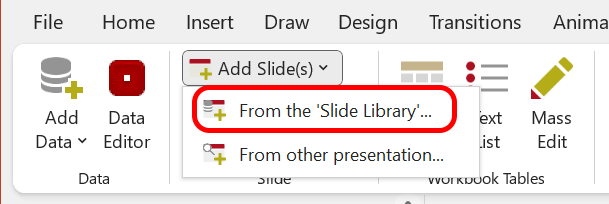
Create a Slide Library
Create a presentation that contains the slides you want to reuse.
- Open Add Slides > From the Slide Library.
- In the pane on the right, click Change to another presentation.
- Select the presentation that contains the slides you want to use.
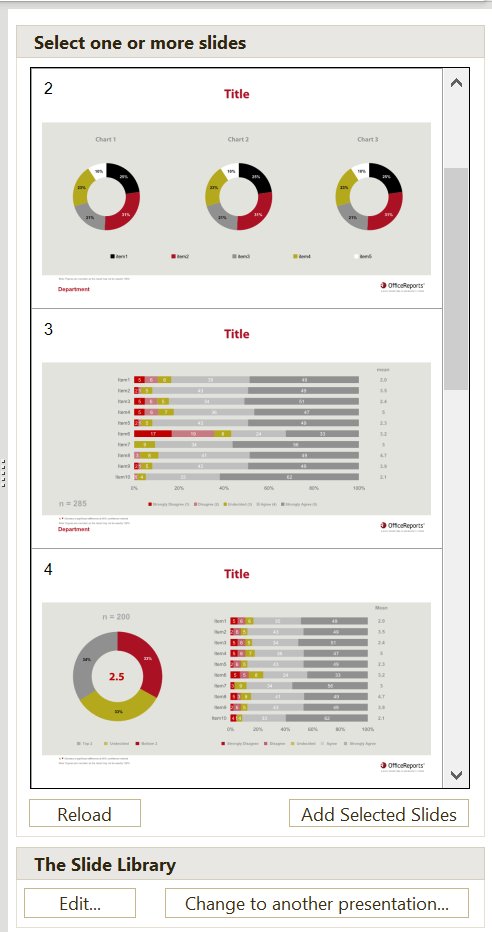
Insert Slides from the Slide Library
- Open Add Slides > From the Slide Library.
- In the pane on the right, select the slides you want to insert.
- Click Add Selected Slides.
You can also use the same process to insert slides from other presentations.
Edit the Slide Library
The Slide Library is an ordinary PowerPoint presentation, which should contain certain shapes on the first slide, which is not shown in the Slide Library UI. You can add and delete any slide you want.
There are 2 ways to edit the Slide Library:
From PowerPoint:
- Open Add Slides > From the Slide Library.
- In the pane on the right, in the bottom, click Edit.
From the OfficeReports App:
- Click Options
- Click Edit Slide Library
Editing the Slide Library will open the presentation in PowerPoint, giving you all the possible functionality to edit it.
Slide Library
Use the Slide Library to insert frequently used slides into a presentation.
The Slide Library is stored as a standard PowerPoint presentation. Its first slide is not displayed in the Slide Library interface and contains shapes used by OfficeReports:
- Four default shapes for displaying significance differences in PowerPoint. These shapes must be named SigHigh, SigLow, SigHigh2, and SigLow2.
- Two grouped shapes used for Interactive Filtering. These groups must be named ORFilter and ORFilterSlicer.
You can edit or replace these shapes, but their required names must remain unchanged.
Create or Select a Slide Library
Create a PowerPoint presentation containing the slides you want to reuse. Then select it as your Slide Library:
- Open Add Slides > From the Slide Library.
- In the pane on the right, click Change to another presentation.
- Select the presentation you want to use as the Slide Library.
Insert Slides from the Slide Library
- Open Add Slides > From the Slide Library.
- In the pane on the right, select the slides you want to insert.
- Click Add Selected Slides.
You can also use this method to insert slides from another PowerPoint presentation without making it your Slide Library.
Edit the Slide Library
You can freely add, edit, reorder, or delete slides in the Slide Library presentation.
There are two ways to open the Slide Library for editing.
From PowerPoint
- Open Add Slides > From the Slide Library.
- In the pane on the right, click Edit at the bottom.
From the OfficeReports app
- Click Options.
- Click Edit Slide Library.
The Slide Library presentation opens in PowerPoint, where you can use the standard PowerPoint functionality to edit it.